
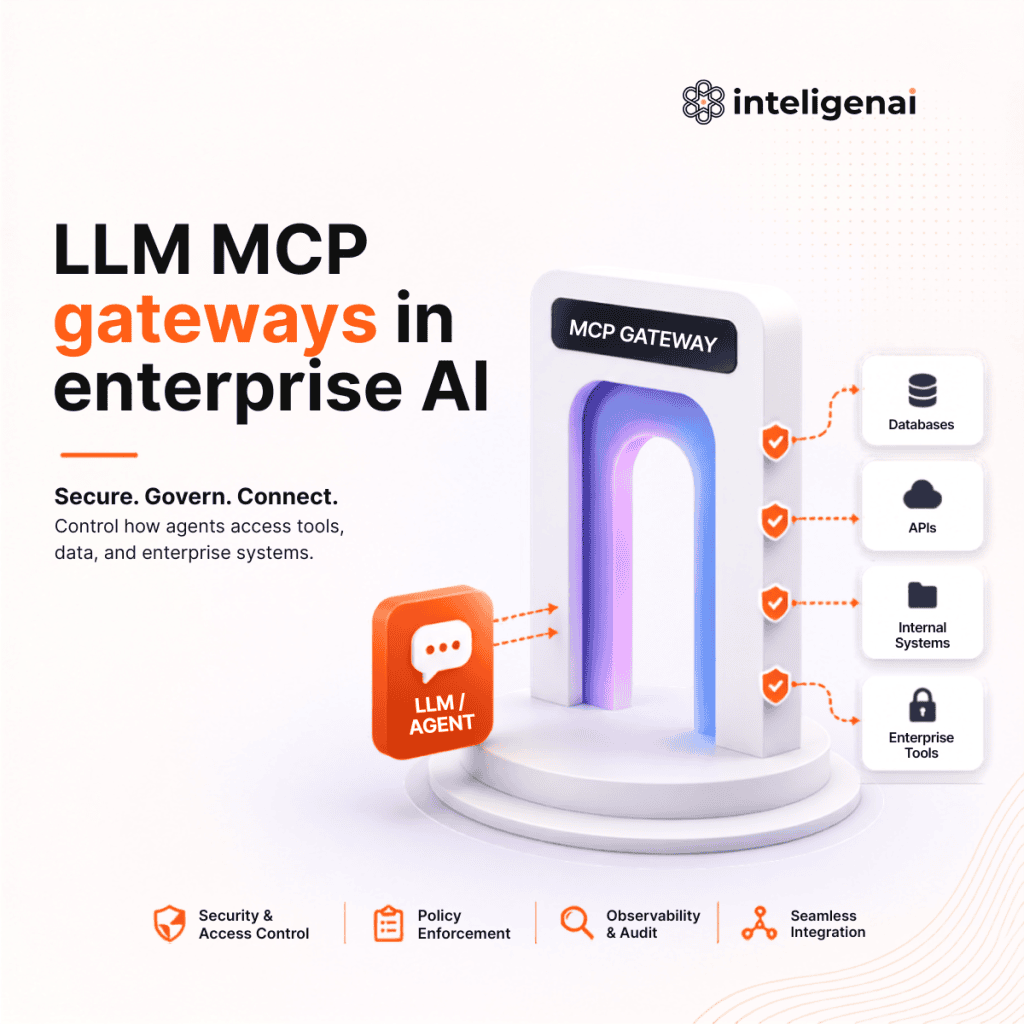
TL;DR: An LLM gateway governs how applications use models: routing, cost, failover and audit. An MCP gateway governs how AI agents use tools: identity, per-tool permissions, schema pinning and human approval. They solve different problems, so enterprises need both, deployed as sequential control layers in three phases: visibility, protection and governance.
Modern enterprise AI operates across two separate channels that are routinely conflated:
- Reasoning: (Application → LLM): Where applications send prompts, receive responses, and consume inference.
- Execution: (Agent → Tool / Data): The path where autonomous agents query databases, call APIs, and modify enterprise state using the MCP.
These paths have fundamentally different responsibilities and different risks. Governing them requires two separate control planes:
- LLM Gateway for governing model interactions.
- MCP Gateway for governing tool execution.
As enterprises scale their AI adoption, controlling what agents are allowed to access has become just as urgent as controlling what models cost.
In this edition of Velocity, we explore why both gateways are essential, how they solve different problems, and how to deploy them together to build secure, production-ready AI systems.
LLM Gateway vs MCP Gateway at a glance
| LLM Gateway | MCP Gateway | |
|---|---|---|
| Governs | Reasoning (Application → LLM) | Execution (Agent → Tool / Data) |
| Sits between | Applications and model providers (OpenAI, Anthropic, Bedrock, Vertex AI) | AI agents and external systems (APIs, databases, MCP servers) |
| Key risks | Vendor dependency, uncontrolled AI spend, scattered API keys | Tool poisoning, schema drift, over-privileged credentials, token theft |
| Core capabilities | Schema normalization, smart routing, token accounting, cost guardrails | Schema pinning, description scanning, per-tool RBAC, human approval |
| Maturity | Relatively mature, several production-ready options | Newer; evaluate whether to build or adopt one |
Part 1: What is an LLM Gateway?
An LLM Gateway sits between your applications and model providers like OpenAI, Anthropic, Bedrock, or Vertex AI. Instead of every application integrating with every provider directly, all traffic flows through the gateway, giving platform teams centralized control over routing, cost, reliability, and governance.
| Capability | Purpose |
|---|---|
| Schema Normalization | Converts different provider APIs into a single interface, making it easy to switch models without changing application code. |
| Streaming Passthrough | Streams tokens to users with minimal latency while tracking usage and enforcing response guardrails. |
| Token Accounting | Uses virtual API keys to attribute usage by team or application while keeping provider credentials out of your codebase. |
| Smart Routing | Automatically routes traffic based on latency, availability, cost, or model performance, with built-in failover during outages. |
| Cost Guardrails | Enforces rate limits and spending caps to prevent expensive runaway agent loops. |
Why is an LLM gateway non-negotiable? | ||||||||||
|
LLM gateway implementation considerations
1. Choosing the right runtime
Every request passes through the gateway, so its latency directly impacts user experience.
- Go/Rust gateways are designed for high concurrency and typically add only microseconds of overhead.
- Python gateways (e.g., LiteLLM) are easier to deploy and support many providers but can experience higher tail latency under heavy concurrent load.
Key takeaway: Benchmark the gateway itself, not just the LLM provider at your expected production traffic.
2. Semantic caching
Semantic caching dramatically improves latency by returning responses for semantically similar prompts rather than exact matches. While this can reduce response times from seconds to milliseconds, similar prompts don’t always have identical intent.
Best practices:
- Cache only read-heavy, low-variance queries.
- Never cache personalized or tool-generated responses without including user identity.
- Use short TTLs to prevent stale responses.
3. Avoid a single point of failure
An LLM Gateway centralizes all AI traffic, which also makes it a potential single point of failure. Keep gateway instances stateless, deploy multiple replicas behind a load balancer, and store configuration and logs outside the request path. This ensures high availability without introducing unnecessary latency.
Part 2: What is an MCP Gateway?
An MCP gateway is a policy checkpoint between AI agents and the tools, APIs and data they can act on. It enforces identity, per-tool permissions, schema checks and human approvals, and records every tool call.
Model Context Protocol (MCP) standardizes how an agent discovers and calls external capabilities. It uses JSON-RPC 2.0 over a transport and exposes three server primitives:
- Tools: Functions the model can call, each with a name, a JSON-Schema input, and a natural-language description.
- Resources: Readable context such as files or records that the host can pull in.
- Prompts: Parameterized templates the server provides.
Why is direct MCP access risky?
Risk | What Can Go Wrong |
|---|---|
Tool poisoning | Malicious instructions hidden inside a tool description manipulate the model before the tool is even called. |
Schema drift | A trusted tool changes its schema or behavior after approval, turning a safe integration into a malicious one. |
Over-privileged credentials | Shared API keys allow compromised agents to access or modify data across tenants. |
Token theft | Forwarding raw user tokens to downstream services exposes enterprise credentials to third-party tools. |
What does an MCP gateway do?
An MCP Gateway sits between your AI agents and external systems, enforcing security before any action reaches production.
Capability | Purpose |
|---|---|
Schema Pinning | Detects unauthorized changes to tool definitions and blocks modified tools. |
Description Scanning | Inspects tool descriptions for hidden prompt injections before exposing them to the model. |
Identity-Aware Authentication | Exchanges user tokens for short-lived, least-privilege credentials instead of forwarding raw secrets. |
Per-Tool RBAC | Exposes only the tools a user is authorized to access, reducing the attack surface. |
Human Approval | Pauses high-risk actions (payments, deletions, infrastructure changes) until explicitly approved. |
Unified Auditing | Records every tool call, input, output, and initiating user for compliance and investigations. |
MCP gateway implementation considerations & trade-offs
An MCP Gateway is more than a security proxy. Because every tool invocation passes through it, the gateway has to balance security, performance, and developer experience.
- Latency vs. Security
Agents often execute multiple tool calls before completing a task. Every security check adds latency, so gateways typically apply lightweight validation by default and reserve deeper inspection for high-risk operations - Standardization vs. Security
MCP now defines an optional OAuth 2.1 authorization framework, but it doesn’t mandate it, and stdio servers are exempt entirely. Because most servers don’t implement it, authentication, authorization, and credential management fall to the gateway. - Security vs. Agent Capability
Giving an agent access to every available tool increases token usage, slows tool selection, and expands the attack surface. Restricting tools too aggressively, however, can prevent the agent from completing complex workflows. A well-designed gateway exposes only the tools required for the current task.
How to deploy LLM and MCP gateways together
An LLM Gateway and an MCP Gateway solve different problems and should be deployed as sequential control layers.
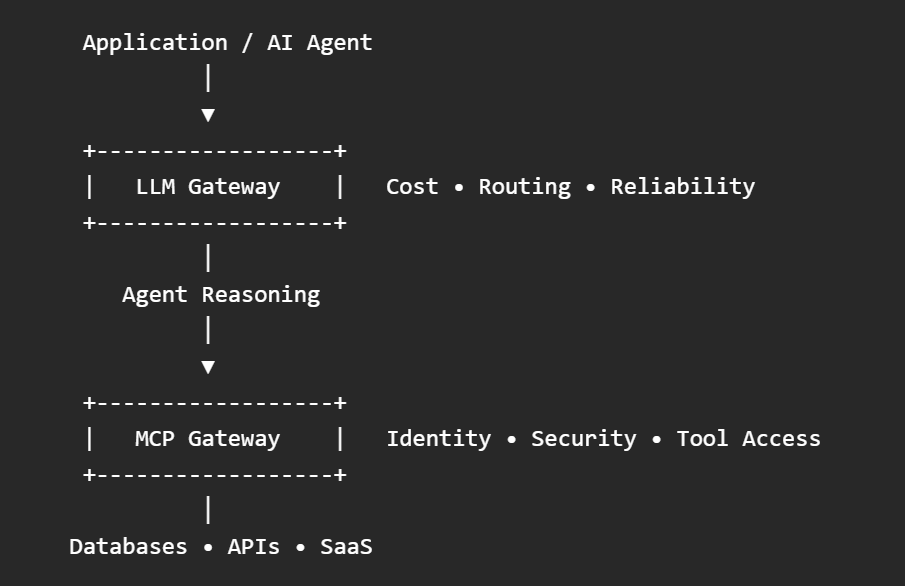
Rollout strategy
Rather than introducing both layers at once, deploy them in phases.
Phase | Focus |
|---|---|
1. Visibility | Centralize LLM traffic, provider keys, and spending. Inventory existing MCP servers and enable audit logging for tool calls. |
2. Protection | Route all tool traffic through the MCP Gateway. Enable schema pinning, description scanning, and block direct connections to unverified MCP servers. |
3. Governance | Introduce identity-aware authentication, per-tool RBAC, Human-in-the-Loop approvals, and organization-wide security policies. |
Operational considerations
Adopting both gateways improves reliability and security, but introduces new operational responsibilities.
Every gateway adds latency. Keep both layers stateless, horizontally scalable, and offload databases from the request path.
The LLM Gateway ecosystem is relatively mature, with several production-ready options available. MCP Gateways are newer, and organizations should carefully evaluate whether to build or adopt one based on their security requirements.
Never rely on prompts for authorization. Instructions like “don’t delete records” are guidance for the model, not enforceable security controls.
Treat authentication as mandatory. Although MCP allows unauthenticated servers, enterprise deployments should require authenticated, scoped, and auditable connections.
Design for security from day one. Retrofitting gateways after agents are already connected to tools is significantly harder than introducing them upfront.
Treating reasoning and execution as the same problem is how enterprise systems end up either overloaded by cost or exposed to unauthorized actions. Put the right gateway in front of each, keep the hot path stateless, and build the security boundaries before the connections go live. If you enjoyed this deep dive, consider subscribing to Velocity, where we explore the architectures, trade-offs, and engineering patterns behind production-ready AI systems.
Explore custom AI solutions for your business
What is an LLM gateway?
A single entry point for all model traffic that handles routing, failover, budgets, rate limits, caching and usage logging, so applications do not each integrate with providers directly.
What is an MCP gateway?
A policy checkpoint between AI agents and the tools, APIs and data they can act on. It enforces identity, per-tool permissions, schema checks and human approvals, and records every tool call.
Does an MCP gateway slow agents down?
Every check adds latency, and agents make many calls. Keep default validation light, cache tool lists using the TTL the server advertises, and reserve deep inspection for high-risk operations
Should we build or buy an MCP gateway?
The LLM gateway market is mature enough to buy. MCP gateways are newer and the protocol is still moving, so weigh your security requirements against the cost of tracking spec changes yourself — the 2026-07-28 revision is a good stress test of that question.
What's the difference between an LLM gateway and an MCP gateway?
An LLM gateway controls model traffic: cost, routing, failover and reliability. An MCP gateway controls what AI agents are allowed to do with tools and data: identity, per-tool permissions, schema checks and human approvals.
Do enterprises need both an LLM gateway and an MCP gateway?
Yes. They govern two separate paths with different risks: reasoning (application to model) and execution (agent to tools and data). Deploy them as sequential control layers rather than treating them as one problem.